
어리바리 신입 개발자의 얼렁뚱땅 개발 기록 ✨
Visual Studio Code 단축키 본문
728x90
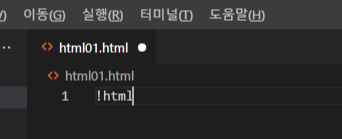
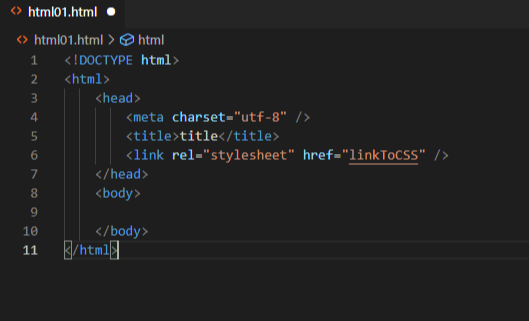
.html 파일을 열고 1번 줄에 !html 치면 자동으로 html 서식 완성 됨.
줄 선택 : 선택할 영역 뒤에 커서 위치 후 shift + home / 선택할 영역 앞에 커서 위치 후 shift + end
드래그 후 ctrl + / : 주석 처리 및 풀림
alt + shift + 방행키 : 복사 붙여넣기
alt + 방향키 : 라인 옮기기
ctrl + space bar : 자동 완성ctrl + 방향키 : 줄 옮김
src="" 에서 "" 사이에 커서 두고 ctrl + space 누르면 같은 작업환경에 있는 파일 목록들 뜬다.
emmet 문법?
[ console.log 사용 ]
출력 라이브러리 설치하지 않고 코드 문제를 해결하거나 데이터 흐름을 추적할 때 요긴하게 사용하는 기능
왼쪽 아래 톱니바퀴 누르고 - user snippets (사용자 코드 조작) - javascript 찾아서 들어가기
{
	// Place your snippets for javascript here. Each snippet is defined under a snippet name and has a prefix, body and
	// description. The prefix is what is used to trigger the snippet and the body will be expanded and inserted. Possible variables are:
	// $1, $2 for tab stops, $0 for the final cursor position, and ${1:label}, ${2:another} for placeholders. Placeholders with the
	// same ids are connected.
	// Example:
	// "Print to console": {
	// 	"prefix": "log",
	// 	"body": [
	// 		"console.log('$1');",
	// 		"$2"
	// 	],
	// 	"description": "Log output to console"
	// }
	"Print to console": {
		"prefix": "csl",
		"body": [
			"console.log($1);",
		],
		"description": "Log output to console"
}
[ 단축키 수정 ]
왼쪽 아래 톱니바퀴 누르고 - keyboard shortcut (바로 가기 키)에서 수정
delete line (줄 삭제) - ctrl + d 로 바꾸면 편하다.

728x90
'Front - end > HTML' 카테고리의 다른 글
| 23.03.08 / 인라인 요소, 블록 요소, 인라인 블록 요소 (0) | 2023.03.08 |
|---|---|
| 23.03.08 / form 태그와 함께 쓸 수 있는 태그들 (0) | 2023.03.08 |
| 23.03.02 / 태그, 요소, 속성 (0) | 2023.03.08 |
| 23.03.02 / VScode (Visual Studio Code) 설치와 실행 (0) | 2023.03.02 |
| 23.03.02 / 기본 키워드 정리 (0) | 2023.03.02 |
'Front - end/HTML' Related Articles
more


